
SAT Desmos: When the Calculator Helps and When It Does Not
A useful SAT Desmos strategy starts with the mathematical relationship, then chooses whether a graph, algebra or a short calculation is the most efficient route. Desmos can reveal an intersection quickly, but it cannot decide which quantity the question asks for or whether a candidate answer satisfies every condition.

On this page
- Choose algebra or a graph in your SAT Desmos strategy
- Example 1: an intersection with an easy algebra check
- Set up expressions correctly
- Example 2: check domain after squaring
- Verify precision, constraints and response
Choose algebra or a graph in your SAT Desmos strategy
The embedded Bluebook calculator is available throughout SAT Math. Current College Board policy offers scientific and graphing calculator modes; a permitted handheld calculator is a separate option. Check the current calculator policy because an old approved-model list may include calculators that no longer meet the rules.
A graph is useful when intersections, roots or the behaviour of a function express the task directly. A short algebraic step may be faster for a simple equation. Before entering anything, identify the unknown, units and any restrictions. Tool choice should simplify that task rather than add unnecessary typing.
The two walkthroughs below use original examples entered in the College Board practice graphing calculator. The screenshots show that practice tool, not an active examination, a secure SAT question or a student’s result.
Example 1: an intersection with an easy algebra check
Original problem: solve 2x + 3 = 13 for x. Enter y = 2x + 3 and y = 13 as separate expressions. Their intersection is (5, 13), so the requested x-value is 5. The point is shown explicitly in the screenshot to make the result easy to inspect.
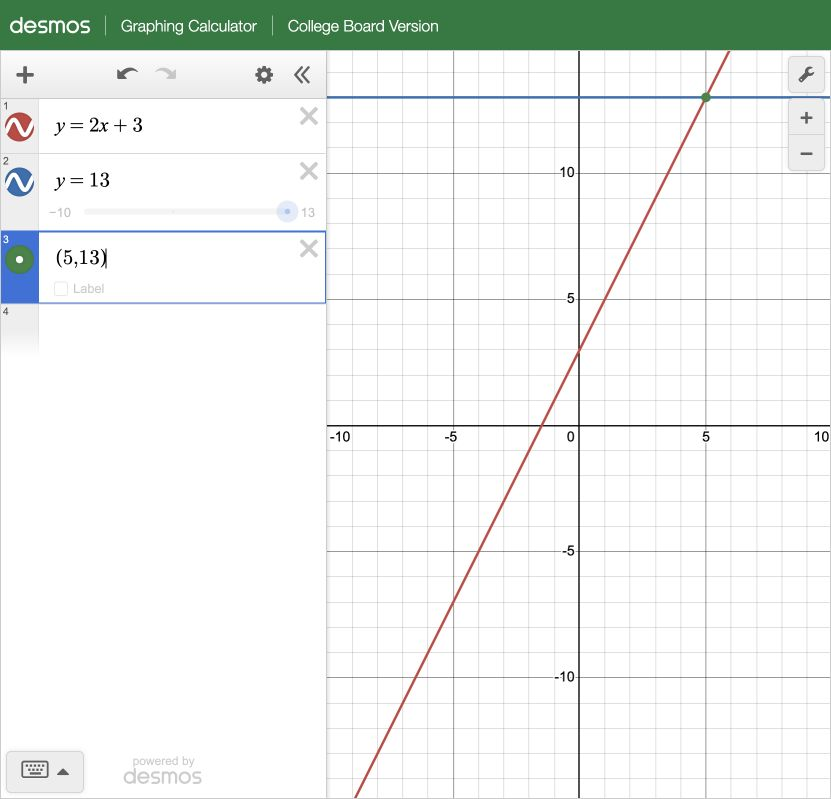
Verify by substitution: 2 × 5 + 3 = 13. Algebra gives the same result by subtracting 3 and dividing by 2. For this particular equation, algebra is probably faster. The graph remains useful for understanding why the answer is an intersection or checking a mistaken sign.
Notice the difference between the point and the response. If the question requests x, submitting 13 would answer the wrong coordinate even though you located the correct intersection. A tool result becomes an answer only after you connect it to the instruction.
Set up expressions correctly
Type each relationship exactly, including parentheses around grouped numerators, denominators or exponents. Compare the displayed expression with the original task before trusting the graph. If your expression is undefined, off-screen or interpreted as several variables, correct the input rather than treating the empty display as proof of no solution.
Adjust the viewing window when relevant values are outside it. The default window is a viewing choice, not the domain of the mathematical function. Read coordinates carefully and retain exact algebra where a rounded display would be insufficient for the required response.
Example 2: check domain after squaring
Original problem: solve √(x + 6) = x over the real numbers. Graph y = √(x + 6) and y = x. The curves meet at (3, 3), giving x = 3. The screenshot also evaluates √(−2 + 6) as 2 so that the rejected candidate can be checked directly.
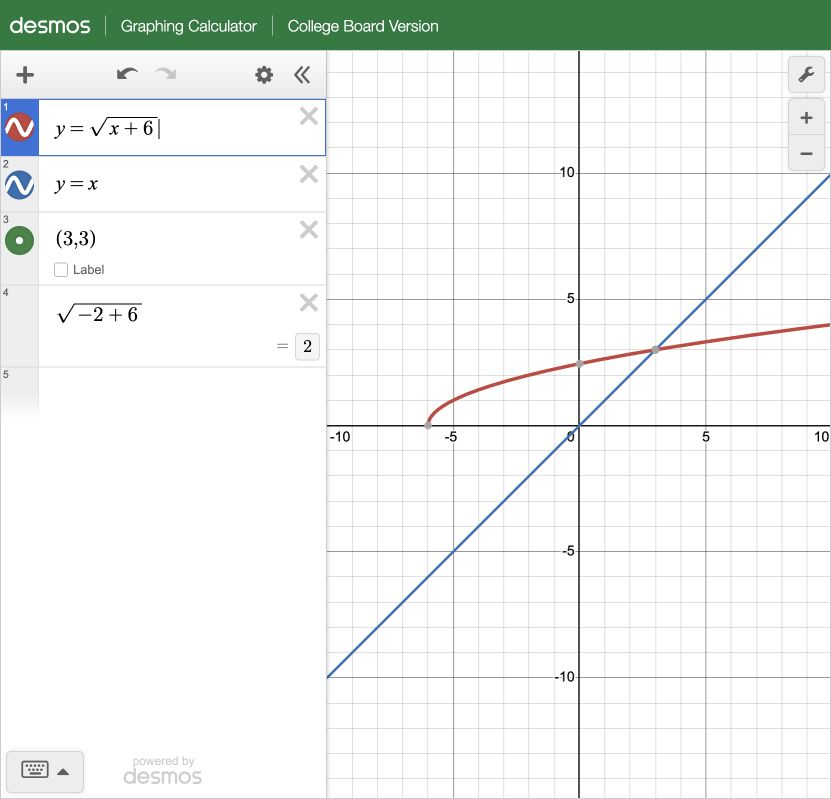
Squaring the equation gives x + 6 = x², or (x − 3)(x + 2) = 0. That produces candidates 3 and −2. However, the original square root is nonnegative, so its equal right-hand side x must be nonnegative too. At x = −2, the original sides are 2 and −2. They are unequal; −2 is extraneous.
The domain of √(x + 6) alone is x ≥ −6, but that restriction by itself does not reject −2. You also need the original equality and the sign of its right-hand side. This is why a remembered “check the domain” slogan is weaker than a complete substitution check.
Verify precision, constraints and response
Before moving on, ask whether all valid solutions are required, whether the variable represents a count or length, and whether the question asks for another expression derived from the solution. Do not round an intermediate result unnecessarily or assume that a visible intersection proves uniqueness outside the displayed window.
Practise both a graphing route and an algebraic explanation on selected tasks from the SAT Math topic directory. Keep calculator-entry mistakes in your review log. The goal is a method you can explain and verify, not a rule that every Math question should be graphed.
Sources and next steps
Test information checked on 22 November 2026. College Board calculator policy; College Board practice graphing calculator; SAT Math. Examples and worksheets are original teaching material, not secure official questions or real student results.
Continue with calculator rules; Math guide. For guided preparation, review SAT classes at MKS Preparation and confirm the current timetable, tuition, feedback and access. Practice: MKS SAT portal according to your account access. Enquiries: [email protected] / 98511-37006.
Continue your SAT preparation
How to Review a Digital SAT Practice Test; Digital SAT Adaptive Modules and Pacing.